
Open protocol · Powered by DigiByte
Sign in with a
signature.
Digi-ID replaces passwords, usernames, and SMS codes with a cryptographic signature from a user's DigiByte wallet. Sites store a public address rather than user secrets. Integration takes minutes.
MIT licensed · Zero SDK fees · Keys remain on-device

- Open sourceMIT libraries, open specifications
- Zero costFree for developers & users with no hidden fees
- Privacy-firstStores only a public address, no personal data
- Phishing defenseSignatures are cryptographically tied to your specific domain
- Flexible deploymentWeb platforms, hardware, physical access controls
- Proven baseBuilt on the DigiByte network (live since 2014)
Why Digi-ID: Security & Control
Eliminates passwords & social login risk.
Passwords are easy targets for leaks and phishing, while social logins hand identity control over to central third parties. Digi-ID uses domain-specific key pairs that stay under the user's control.
| Criteria | Passwords + SMS | OAuth / “Sign in with X” | Digi-ID |
|---|---|---|---|
| Who holds the secret | Your database (hashed) and the user's memory | The identity provider | Only the user's wallet |
| What your site stores | Email, password hash, phone number | Profile data shared by the provider | One public address |
| Phishing & credential stuffing | Vulnerable | Reduced, still phishable | Signature is bound to your domain |
| Vendor lock-in | None | Provider can suspend or track users | None — open protocol |
| Cost | SMS fees, breach risk | Free to paid tiers | Free, no transaction fees |
| Doors, kiosks, offline sites | Keypads and cards | Not designed for it | Same QR flow, any callback URL |
How it works
Four steps, one QR code.
No accounts to create, no codes to type. The wallet derives a key just for your site and signs your challenge.
-
01 · Generate
Your app shows a challenge
A unique, short-lived nonce inside a
digiid://URI, shown as a QR code and a link.digiid://example.com/callback?x=9f2c… -

02 · Scan
The user scans it
A Digi-ID wallet derives a key pair that exists only for your domain.
m/13'/A'/B'/C'/D' -
03 · Approve
They approve with PIN or biometrics
The wallet signs the challenge. The private key never leaves the phone.
sign(uri) → signature -

04 · Verify
Your server verifies and signs them in
Check the signature, consume the nonce, and use the address as the user's ID.
POST /callback { address, uri, signature }
Integrate in minutes
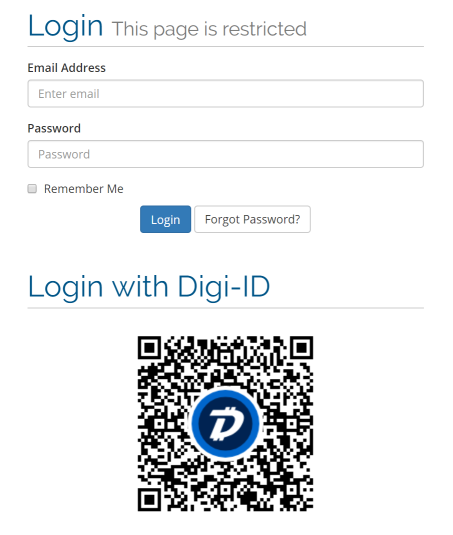
Direct cryptographic verification.
Verification happens locally on your server. No blockchain calls, external network lookups, or third-party service dependencies required.
- Works offline: No network calls to verify
- Libraries for Node.js, PHP, WordPress and phpBB
- Wallets post plain JSON: Easy to handle in any language
// server.js — verify the wallet callback (Express)
app.post('/digiid/callback', express.json(), express.urlencoded({ extended: false }), (req, res) => {
  const { address, uri, signature } = req.body;
  if (!address || !uri || !signature) return res.status(400).json({ error: 'missing fields' });

  const digiid = new DigiID({ address, uri, signature, callback: CALLBACK });
  const challenge = pending.get(digiid.nonce);

  if (!digiid.uriValid() || !challenge || challenge.expires < Date.now()) {
    return res.status(410).json({ error: 'unknown or expired challenge' });
  }
  if (!digiid.signatureValid()) return res.status(401).json({ error: 'invalid signature' });

  pending.delete(digiid.nonce);            // single use: a replay now fails
  sessions.login(challenge.sessionId, address); // address = the user's ID for your site
  res.json({ message: 'Digi-ID verified' });
});<?php
// callback.php — verify the wallet callback (digiid-php)
require_once __DIR__ . '/DigiID.php';
$digiid = new DigiID();
// Wallets send JSON; manual signing tools send form fields.
$input = json_decode(file_get_contents('php://input'), true) ?? $_POST;
$address = (string) ($input['address'] ?? '');
$signature = (string) ($input['signature'] ?? '');
$uri = (string) ($input['uri'] ?? '');
$nonce = $digiid->extractNonce($uri);
$row = $db->prepare('SELECT session_id FROM digiid_nonces WHERE nonce = ? AND expires_at > ? AND address IS NULL');
$row->execute([$nonce, time()]);
$challenge = $row->fetch();
$expectedUri = $digiid->buildURI('https://www.example.com/digiid/callback.php', $nonce);
if (!$challenge || $uri !== $expectedUri
|| !$digiid->isMessageSignatureValidSafe($address, $signature, $uri)) {
http_response_code(401);
exit(json_encode(['error' => 'invalid or expired Digi-ID challenge']));
}
// Consume the nonce and attach the verified address to the waiting session.
$db->prepare('UPDATE digiid_nonces SET address = ? WHERE nonce = ?')->execute([$address, $nonce]);
echo json_encode(['message' => 'Digi-ID verified']);// login.js — show the challenge in the browser
import QRCode from 'qrcode';
const { uri, nonce } = await fetch('/digiid/challenge', { method: 'POST' }).then((r) => r.json());
// Tappable on mobile (opens the wallet), scannable on desktop.
document.querySelector('#digiid-link').href = uri;
await QRCode.toCanvas(document.querySelector('#digiid-qr'), uri, { width: 240 });
// Wait for the wallet to call back, then continue the session.
const poll = setInterval(async () => {
const { state } = await fetch(`/digiid/status?nonce=${nonce}`).then((r) => r.json());
if (state === 'verified') {
clearInterval(poll);
location.assign('/account');
}
}, 2000);# 1. The server needs the PHP GMP extension
php -m | grep -i gmp
# 2. Upload the plugin and activate it
git clone https://github.com/DigiByte-Core/digiid-wp-authentication \
wp-content/plugins/digiid-wp-authentication
wp plugin activate digiid-wp-authentication
# 3. The login screen now shows a Digi-ID QR code.
# Note: the plugin was last tested with WordPress 4.1.POST /callback HTTP/1.1
Host: digiid.digibyteprojects.com
Content-Type: application/json
{
"address": "DJDAkjie6nrW6RpFZSTpNUXsZ9JE2x6p1o",
"uri": "digiid://digiid.digibyteprojects.com/callback?x=c6140375e5bae71e",
"signature": "H3tlK3RciMR60PuE0jE6JuClqgh+E8MmMz+n+4+P7FAIVuUccs+npnIa6Gz8XAJeOilTWpLNbomXtVDe4gR0CNk="
}Real-world use
Built for every sign-in point.
One protocol and QR scan across web apps, admin tools, and physical doors.

Website & SaaS login
Eliminate passwords, reset flows, and SMS 2FA costs.

Checkout without accounts
Returning customers, zero sign-up forms.

Gaming accounts
Bind player assets and profiles directly to wallet signatures.

Doors, lockers & IoT
Replace swipe cards with a scan.

Identity & age checks
Cryptographically prove returning status without re-entering personal data.
Internal tools & admin panels
Strong sign-in without an identity-provider bill.
Forums & communities
Pseudonymous, spam-resistant membership.
Events & check-in
Dynamic ticket authentication that prevents screenshot fraud.





For wallet users
Have a DigiByte wallet? You may already have Digi-ID.
Look for the Digi-ID or “Scan to log in” option in your DigiByte wallet. Each site gets its own key, so sites can't track you across the web.
Get a DigiByte wallet01
Open the site or app
Choose “Sign in with Digi-ID”.
02
Scan the QR code
Or tap the link on your phone.
03
Check the site name
Approve with your PIN or fingerprint.
04
You're in
No password to remember or leak.
Learn more
Read the one-page overview.
The gist of Digi-ID on a single page. Updated September 2026.
Read the overview (PDF, 0.5 MB)Open source · Community built
Build the passwordless web with us.
Digi-ID has no company, no tokens to sell and no admin keys. Libraries, plugins and this site are maintained by volunteers. Ship an integration, improve a library or put your app on the map.